
User Message Creation API
4 min
The User Message Creation API will allow you to add messages/comments to any specific shipment by entering the tracking ID.
To add messages/comments for a load using the Load Number in addition to FourKites Tracking ID, click here.
Rate Limit
1 request per second
Format Supported
JSON
Authenticated Resource
API Key
For more information on Authentication, click here.
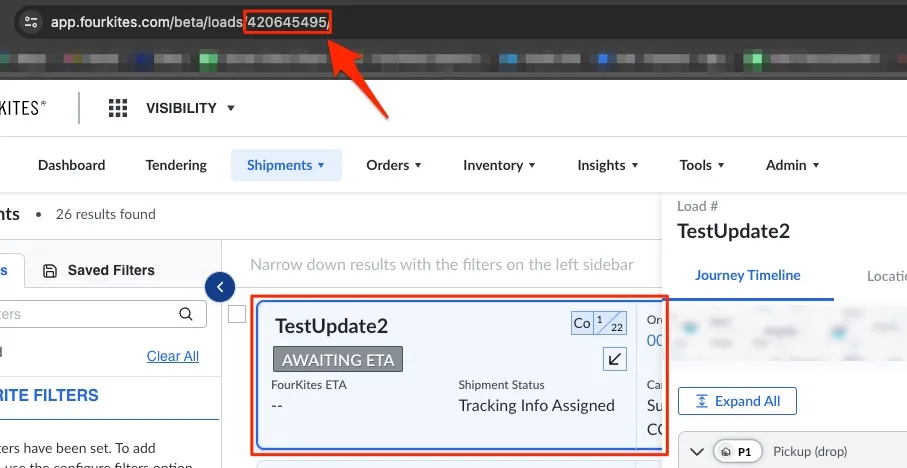
The Tracking ID/FourKites internal loadId that is returned during load creation should be added to the endpoint to update the load. Click on the load that you would like to add User Message / Comments to get the Tracking ID as shown in the image below.
Production
POST
https://api.fourkites.com/api/v1/tracking/{trackingId}/messages
curl --location -g --request POST 'https://api.fourkites.com/api/v1/tracking/{trackingId}/messages' \
--header 'Content-Type: application/json' \
--header 'apikey: <apikey>' \
--data-raw '{
  "message": "Message",
  "sendToDriver": false
}'
Staging
POST
https://api-staging.fourkites.com/api/v1/tracking/{trackingId}/messages
import http.client
import json

conn = http.client.HTTPSConnection("api-staging.fourkites.com")
payload = json.dumps({
  "message": "Message",
  "sendToDriver": False
})
headers = {
  'Content-Type': 'application/json',
  'apikey': '<apikey>'
}
conn.request("POST", "/api/v1/tracking/{trackingId}/messages", payload, headers)
res = conn.getresponse()
data = res.read()
print(data.decode("utf-8"))