
Dispatcher Update - Asynchronous
Introduction
The Dispatcher Update API allows authorized carriers and fleet owners to update loads in bulk. For example, you can use this API to update tracking information or stop appointment time for multiple loads at a time. The Dispatcher Update API supports any number of records. However, the records are processed in batches of 200
Load updates include the following:
- Assignment updates
- Stop Appointment or stop-level event updates
- GPS/location-based tracking
- Load event updates. Event updates including FTL, LTL, Ocean, Rail, or Air event updates
- Load Information updates
- ETA updates
- Temperature tracking
In this API documentation, you can find sample payloads for all of the above load update categories. Also in each of the categories, we have defined Field definitions and examples.
Note that new carriers must use the asynchronous version of the Dispatcher Update API and not the legacy version. The legacy version of the Dispatcher Update API can be used for existing integrations only as a reference.
Generate API Credentials
Once you receive your FourKites login credentials from through your invitation to FourKites, you can log into the site at the following URL:
If you have not received a link to login to FourKites, please contact FourKites support and supply the name of your company: [email protected]
Once logged in, you can head to the Developer Portal, which is where API keys can be generated / managed. To navigate Developer Portal, click on the "Visibility" menu located at the header of the FourKites platform as shown in the image below and select "Developer Portal"
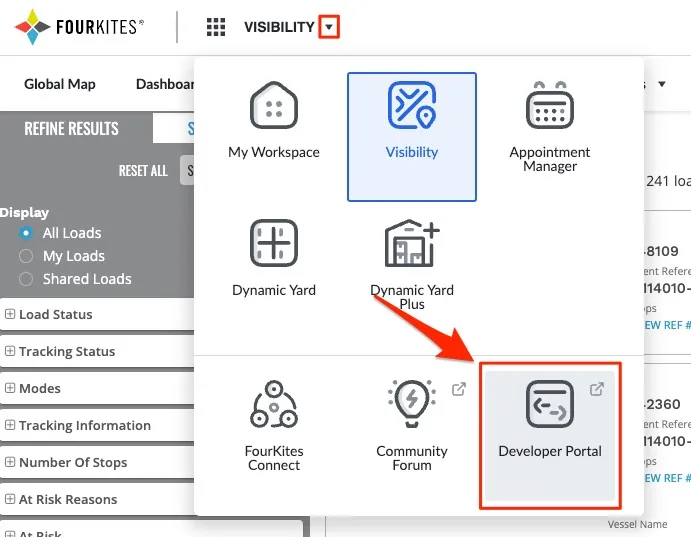
Choosing the Developer Portal menu from the FourKites header will take you to the portal landing page. Once there, toggle to API Management:
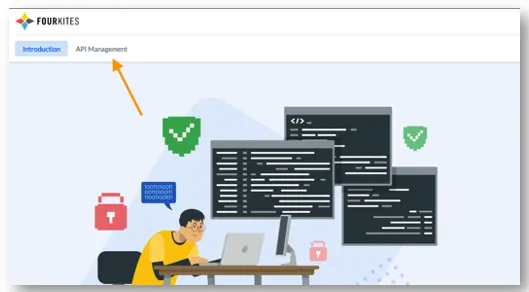
In the API Management page, you can generate an API key. Please enter the following information:
App Name (Required): in this field, please specify an alias or name of the application which will be sending load data to FourKites
IP Address (Optional): if there is a static IP from the system generating load data to FourKites, you can specify it here. However, the field is optional and can be left blank
API Bundles: You can then subscribe to the "Carrier Visibility" bundle
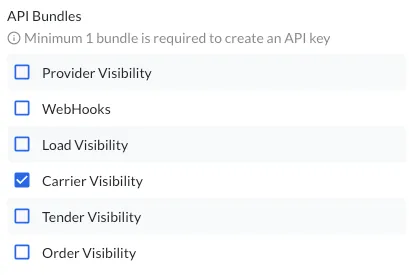
Authentication
The API uses API key to authenticate requests. Each request requires an API key in order to authenticate. Below is an example cURL request showing the basic structure of an API call:
curl --location -g --request POST 'https://api.fourkites.com/load/update/dispatcher-api/async' \
--header 'apikey: API_KEY' \
--header 'Content-Type: application/json' \
--data-raw '{}'
Rate Limiting
The FourKites Dispatcher API has rate limits that cap the number of requests that can be successfully made. If you exceed the specified rate limit, your request will be throttled, and you will receive HTTP 429 Too Many Requests response from the API. The rate limits will be applied per apikey and the default rate limit is 60 requests per minute
Below are the response headers related to the rate limit, that can be used for retries. For example, in cases where there are intermittent spikes in request rate, an exponential retry can be implemented.
Header | Format | Description |
|---|---|---|
X-RateLimit-Limit-minute | Integer | Total number of requests permitted for the apikey per minute |
X-RateLimit-Remaining-minute | Integer | Number of API request that will be accepted in the current minute |
API Response Specification
- The API response format would always be in "application/json" Content-Type
- The response body structure would always remain the same as given below, in case of success or error
- Only in case of 5xx or API service not available, you would not receive a response body format as below
- The API status code would be same as standard HTTPS status code
- API "requestId" is the UUID of any given API request - this would be unique key that can be used to tag for any given API request or load update - if Accepted was it processed to the FourKites load or not due to business logic validation
{
    "requestId": //This would have Universally Unique IDentifier (36-character UUID)
    "status": // API response status # 202, 400, 401, 500, etc
    "message": // API response message # “API Request Accepted" or error description
    "timestamp": //API request call time in UTC. Format — yyyy-MM-dd'T'HH:mm:ss.SSSSSS
}
Identifier Keys
Identifier Keys are the values which FourKites uses to match data with a specific load on our platform. These are commonly reference numbers, PO numbers, load numbers, BOL numbers, etc.
You can find an example identifier for each shipper, within FourKites Connect, under "Sample Reference Numbers."
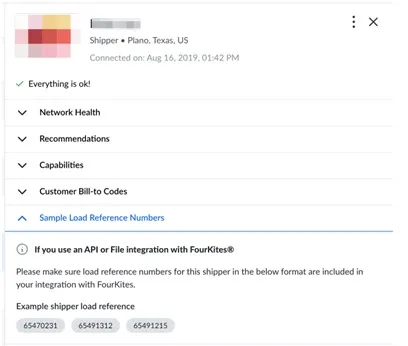
To simplify or remove middleware data-mapping for carriers. FourKites provides carriers the option to send multiple identifiers per load, up to 4.
Multiple Identifiers Option
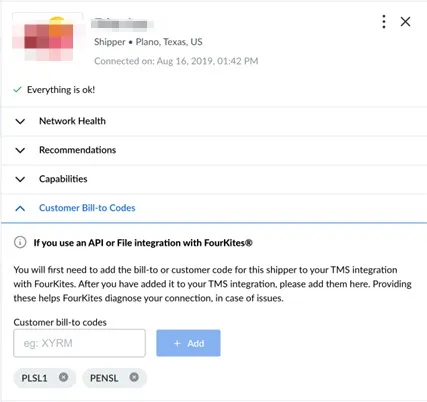
• If you chose to send multiple identifiers per load, you must also include the Bill-to-Code (or shipper ID) for that load in the payload. • The Bill-to-Code for that shipper must also be provided to FourKites. You can input Bill-to-Codes for the shipper using FourKites Connect (app.fourkites.com/self-service) • When multiple identifiers are present, FourKites will attempt to apply the update to loads for that shipper, searching the first index of the array, then second, and so forth.
Single Identifier Option
• When sending a single identifier per load, including the shipper’s Bill-to-Code (or shipper identifier) is not required, but still recommended. • When the Bill-to-Code is NOT present nor provided to FourKites, we will attempt to match the load identifier to the FourKites Load Number across all shippers in the carriers network. • If the Bill-to-Code is included and provided to FourKites, we will attempt to match the single identifier across all reference numbers for that load on FourKites
IdentifierKeys API specs
- “identifierKeys” should always be an Array - “identifierKeys” can have 1 or multiple array of load references, maximum allowed up to 4. This means, Dispatcher API service supports up to 4 load references to match to the FourKites load
Attribute | Type | Description | Example | Mandatory (M)/ Optional (O) |
|---|---|---|---|---|
identifier | String | Enter theFourKites Load referenceof the load provided by the Shipper for which you want to update information | "Load123" | M |
rawIdentifier | String | Enter your or carrier Load reference of the load provided by the Shipper. This could be the Load reference format that is available on your TMS, and can be used for informational purpose | "Load123000" | O |
identifierType | String | Enter the LoadIdentifier Type for the provided Load reference. This can be FourKites defined list of IdentifierType or can be carrier TMS IdentifierType. IfFourKites defined valueis given, the matching priority would be given only to available IdentifierType from API. If any other value, then this value can be used for informational purpose | “loadNumber” FourKites defined value→ ["loadNumber", "proNumber", "loadReferenceNumber", "loadTrackingNumber", "carrierReferenceNumber"] | O |
API request format with "IdentifierKeys" only
{
    "updates": [
        {
            "identifierKeys": [{
                    "identifier": "Load reference #1",
                    "rawIdentifier": "Carrier format - Load reference #1",
                    "identifierType": "Load reference1 identifier type in FourKites or Carrier company"
},
{
                    "identifier": "Load reference #2",
                    "rawIdentifier": "Carrier format - Load reference #2",
                    "identifierType": "Load reference2 identifier type in FourKites or Carrier company"
}]
        }
    ]
}
BillToCode specifications
Bill-to-Codes are the values you use to identifier the shipper of a load. They are labeled “Bill-to-Codes” on our platform because most carriers separate their data by specific accounts for each shipper. While FourKites is not involved in invoicing or payments, we find that this is the most common field to identify data by shipper. It may also be referred to as “External ID” or “Shipper ID.”
While optional when using the single-identifier option, providing Bill-to-Codes is best practice to ensure quality tracking, and easier troubleshooting.
Please ensure you input all Bill-to-Codes for each shipper/customer in your network on FourKites Connect.
Attribute | Type | Description | Example | Mandatory (M)/ Optional (O) |
|---|---|---|---|---|
billToCode | String | Enter the shipper unique identifier which is available at carrier TMS to identify Customer as well as in the FourKites shipper-carrier network. This is mandatory field | "customerid123" | M - When using multiple identifier options. O - When using single identifiers per load |