
Manage Loads & Appointments
This API should only be used if the Core Track or Appointment Manager product have been purchased.
Core Track Usage
The Create Load API supplies a single API to seed data into all 3 FourKites products. Below are the 3 objects which can be created via a single message:
- Core Track: Create a load for real-time tracking
- Appointment Manager: Create an appointment for a shipment which can be scheduled/rescheduled by carriers
- Dynamic Yard: Add pending arrivals or departures at a live Dynamic Yard site
If the FourKites Core Tracking platform is used, then loads created in Core Track will automatically integrate into Dynamic Yard, creating pending deliveries. This allows for the usage of a single TMS integration with FourKites at the Core Track level. From there, references, trailer numbers, appointments, and other information already sent to Core Track will automatically populate in Dynamic Yard.
The following API specification is only if Core Track or Appointment Manager is not used. If the Core Track platform is used, then no separate load or delivery integration needs to be built.
Authentication
The Create / Update Load API uses API key to authenticate requests. This key can be generated from the FourKites Developer Portal. Each request requires an API key in order to authenticate:
Production:
curl --location -g --request POST 'https://api.fourkites.com/api/v1/tracking' \
--header 'apikey: {{apiKey}}' \
--header 'Content-Type: application/json' \
--data-raw '{}'Staging:
curl --location -g --request POST 'https://api-staging.fourkites.com/api/v1/tracking' \
--header 'apikey: {{apiKey}}' \
--header 'Content-Type: application/json' \
--data-raw '{}'
Rate Limiting
Fourkites APIs have rate limits that cap the number of requests that can be successfully made. If you exceed the specified rate limit, your request will be throttled, and you will receive HTTP 429 Too Many Requests response from the API. The rate limits will be applied per apikey and the default rate limit is 60 requests per minute. Please contact your Customer Success Manager to request an increase in the rate limit.
Below are the response headers related to the rate limit, that can be used for retries. For example, in cases where there are intermittent spikes in request rate, an exponential retry can be implemented.
Header | Format | Description |
|---|---|---|
X-RateLimit-Limit-minute | Integer | Total number of requests permitted for the apikey per minute |
X-RateLimit-Remaining-minute | Integer | Number of API request that will be accepted in the current minute |
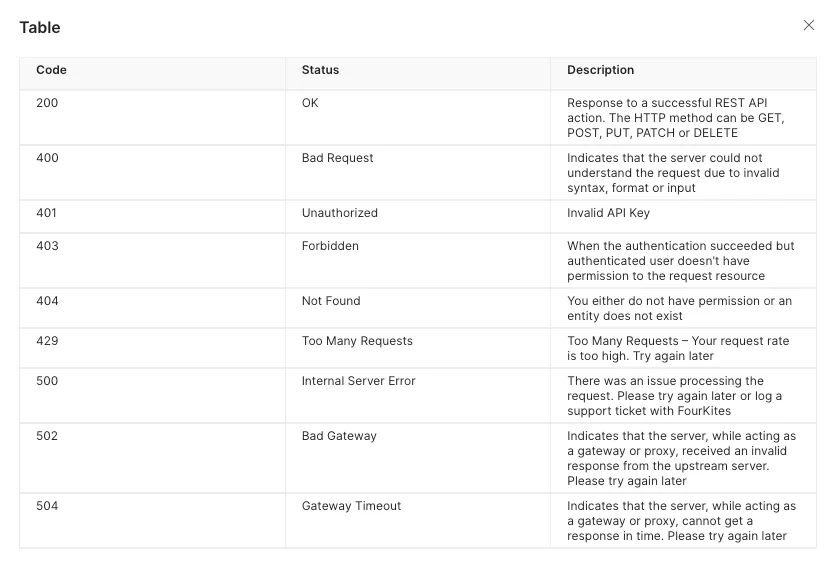
Status Codes
FourKites uses conventional HTTP response codes to indicate the success or failure of an API request.
- Codes in the 2xx range indicate success
- Codes in the 4xx range indicate an error due to the information provided (e.g., a required parameter was omitted, an invalid value given, etc.)
- Codes in the 5xx range indicate an error with FourKites' servers (these are rare)/
Error Handling
Each request has specific errors that are detailed throughout the documentation. This document contains a general description of errors that could occur across all request types and a description of the common error response format. There are two errors formats which denote generic/default and custom errors which can be resource or action-specific.
Default Errors
Default errors contain a message in the body which provides information about the nature of the error:
{
  "message": "No API key found in request"
}
Custom Errors
Custom errors provide an object with different keys containing information about the error. Custom error codes and the details in the errorDetails field are not directly related to a HTTP Status Code as it can mean request or resource specific errors as described below
{
  "errorCode": 2002,
  "errorDetails": ["Invalid value for param: shipment.type"],
  "errorMessage": "Validation Exception",
  "occurredAt": "2020-07-28T06:46:30Z",
  "requestId": "brlfhvhghpuac6sl1jrg"
}
The following table outlines different custom errors:
Full and Partial Updates
There are 2 types of updates which can be performed on FourKites loads:
Full Update: The entire payload representation is sent again with the latest information on the load. FourKites will detect any field(s) which have changed and run it as an update. If certain field(s) have not changed then they will not be altered
Partial Update: Only the field(s) which have changed are sent in the message. This allows a more targeted approach to updates but requires the source system to know which fields have been changed.
The full update is invoked using a query parameter simpleUpdate=true. Leaving this parameter off of the request will default to a partial update.
Field Definitions
The following field definitions outline the most common and useful fields for creating loads for use in Appointment Manager and Dynamic Yard. For additional field-level specifications which may be outside this list please visit the "Create Load" section of the FourKites Developer Portal.
Load / Shipment Details
- loadNumber
- Type: String
- Required: M
- Description: Unique load identifier from shipper's system. The load Number or BOL is an important piece of information used to link the load with truck information received from the Carrier's TMS
- carrier
- Type: String
- Required: O
- Description: SCAC or Service Provider ID of the carrier assigned to the load. The carrier should have approved sharing of their telematics data on FourKites for the customer
- nonTrackable
- Type: Boolean
- Required: O
- Description: indicator specifying if the load should be created in the Core Track platform. If "true" the load will bypass Core Track (as it is considered "non-trackable") but the data will continue to pass down to Appointment Manager and Dynamic Yard for use as appointments and deliveries
- referenceNumbers
- Type: String
- Required: M
- Description: List of unique identifiers for the load. These can be used to search for the load the platform
- tags
- Type: String
- Required: M
- Description: List of labels or categories associated with the load. Tags can be used to filter groups of loads
- proNumber
- Type: String
- Required: O
- Description: Number created usually after pickup or at pickup for LTL loads
- trackingNumber
- Type: String
- Required: O
- Description: Tracking number provided by the carrier. Used only for parcel loads
- priority
- Type: String
- Required: O
- Description: Indicates whether the load is normal or priority. Valid values:
- normal
- high
- hot
Stop Details
- addressLine1
- Type: String
- Required: M
- Description: First line of the stop’s street address
- addressLine2
- Type: String
- Required: O
- Description: Second line of the stop’s street address
- city
- Type: String
- Required: M
- Description: Stop's city
- state
- Type: String
- Required: M
- Description: State / region of the stop. Must be a valid ISO code for the state / region. In the US, these are the 2-character state codes
- postalCode
- Type: String
- Required: M
- Description: Valid postal code of the stop
- country
- Type: String
- Required: M
- Description: Valid country code of the stop
- externalAddressId
- Type: String
- Required: O
- Description: It is the unique identifier of the address in FourKites. This ID is sent in place of address information. UNLOCODE is preferred for port stop creation in the FK platform.
- timeInUtc
- Type: Boolean
- Required: O
- Description: Indicates whether the appointment times sent in the message are in UTC. By default, FourKites assumes the times are in the local time of the stop
- appointmentTime
- Type: String
- Required: O
- Description: Scheduled appointment time of the stop in ISO-8601 format
- earliestAppointmentTime
- Type: String
- Required: O
- Description: In the case of a window of earliest/latest times, this is the early window of the appointment time in ISO-8601 format. If this time matches that in the “latest” field it will combine to a single time in the platform
- latestAppointmentTime
- Type: String
- Required: O
- Description: In the case of a window of earliest/latest times, this is the late window of the appointment time in ISO-8601 format. If this time matches that in the “earliest” field it will combine to a single time in the platform
- referenceNumbers
- Type: Array
- Required: O
- Description: List of unique references associated with the stop
- sequence
- Type: String
- Required: O
- Description: The stop’s sequence in the order of pickup / delivery. It is recommended to start with 1 (for the first pickup) and increment by 1 for each subsequent stop
- stopReferenceId
- Type: String
- Required: O
- Description: Alphanumeric code generated in the load creator’s system which is unique to a specific stop in a specific load. It is used to know which stop and update is applied to in FourKites
- customer.id
- Type: String
- Required: O
- Description: Unique identifier for a customer loaded in the shipper’s master data in FourKites. Please refer to supporting documentation on using customers in FourKites
- customer.poNumbers
- Type: Array
- Required: O
- Description: List of PO Numbers associated with the stop
- loadingType
- Type: String
- Required: O
- Description: Designates whether the shipment should be handled Live or as a Drop-and-Hook. Valid values include: live | drop
- This field determines the Appointment Type in Appointment Manager
Pallet Details
FourKites supports storing limited information about the pallets or freight associated with a shipment. The pallet information can be included as part of the stop object (so it can be unique for pickup and/or delivery). The structure is as follows.
Inside the parts array is an object representing each individual pallet. The field definitions below correspond to each individual pallet. Within the pallet object, each field is considered optional. This means that you can only include quantity and weight, or any other combination of fields within the object.
Pallets are optional and do not influence tracking, appointment scheduling, or Dynamic Yard features. The information contained here is for viewing / informational purposes inside the Core Track and Appointment Manager products only
"pallets": [
    {
        "parts": [
            { ...1st pallet... },
            { ...2nd pallet... }
        ]
    }
]- customerPartNumber
- Type: String
- Required: O
- Description: Unique number representing a number associated with the customer's part(s). This is a free-text field, so this can represent any value, not necessarily one which maps to a "part". This value is only visible in the Core Track platform, it is not visible in Appointment Manager or Dynamic Yard
- shipperPartNumber
- Type: String
- Required: O
- Description: Unique number representing a number associated with the shipper's part(s). This is a free-text field, so this can represent any value, not necessarily one which maps to a "part". This value is only visible in the Core Track platform, it is not visible in Appointment Manager or Dynamic Yard
- quantity
- Type: String
- Required: O
- Description: Quantity of pieces on the pallet. In Appointment Manager, all values in this field will summed and shown in the "Total Pallets Count" field. This value is only visible in the Core Track and Appointment Manager platforms, it is not visible in Dynamic Yard
- weight
- Type: String
- Required: O
- Description: Total weight of items on the pallet. In Appointment Manager, all values in this field will summed and shown in the "Total Weight" field. This value is only visible in the Core Track and Appointment Manager platforms, it is not visible in Dynamic Yard
Asset Information
- truckNumber
- Type: String
- Required: O
- Description: Tractor or asset number assigned to the load. Typically, this is received from the carrier via FourKites’s carrier integrations
- trailerNumber
- Type: String
- Required: O
- Description: Alphanumeric code generated in the load creator’s system which is unique to a specific stop in a specific load. It is used to know which stop and update is applied to in FourKites
- containerNumber
- Type: String
- Required: O
- Description: Alphanumeric code generated in the load creator’s system which is unique to a specific stop in a specific load. It is used to know which stop and update is applied to in FourKites